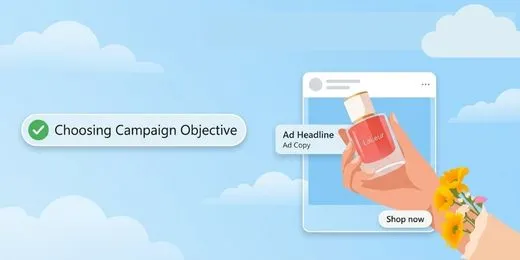
1. Selecting the Right Campaign Objective
Your objective acts as explicit instructions for Meta's AI algorithms. Choosing an objective determines which users within your audience will see your ads based on their historical behavior—whether that’s clicking links, watching videos, submitting contact forms, or making purchases.
Meta's system evaluates real-time engagement data to show your creative to people most likely to perform the action you select.
Aligning Goals with Business Outcomes
Engagement
Drive video views, post interactions, Page likes, and direct direct messaging conversations.
Traffic
Direct prospective clients to your website, landing page, app, or event page via link clicks.
Awareness
Maximize overall impression delivery and ad recall across broad target markets.
Sales
Find users ready to purchase products or convert directly on your catalog or site.
App Promotion
Drive app installs and specific repeat in-app engagement events.
Leads
Collect contact information efficiently via instant forms, chats, and calls.
Meta Ads Manager
Campaign Setup & Analytics2. Audience Targeting & AI Automation
Reaching the right prospective customer reduces cost-per-acquisition (CPA) and boosts ad relevance.

Broad Target Optimization with Advantage+
Meta's Advantage+ audience replaces strict interest barriers with flexible algorithmic discovery. It takes your input parameters—such as seed customer lists or demographic preferences—and uses them as suggestions while exploring wider targeting pools to secure conversions at lower costs.

Advantage+ Execution Steps
- 1 Open campaign settings and select the Ad Set level.
- 2 Verify that Advantage+ audience is selected.
- 3 Specify firm audience constraints (e.g. age or locations).
- 4 Add optional interest suggestions to give the AI directional cues.
- 5 Deploy campaigns and allow system optimization using AI.
3. Strategic Budget Allocation
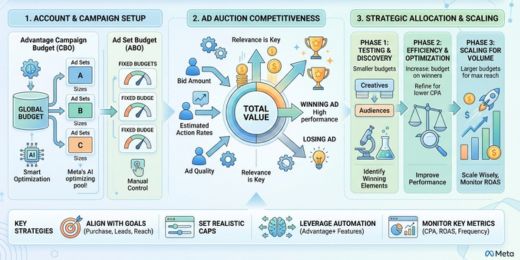
Budgeting for Auction Competitiveness
Your budget determines how aggressively Meta bids for prime ad placements. Adequate financial backing combined with proper timing gives the auction machine room to gather conversion signals and exist the initial learning phase smoothly.
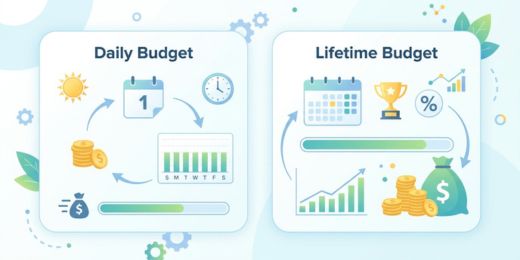
Daily Budget vs. Lifetime Budget
Daily Budgets set average daily expenditure targets, permitting automated spikes up to 75% on high-opportunity days. Best for standard, ongoing campaigns.
Lifetime Budgets assign a capped expenditure pool spread over defined campaign dates, ideal for fixed promos and automated day-parting schedules.
4. Creative Execution & Ad Copywriting
Visuals and copy do the heavy lifting in Meta's auction. High-quality visuals increase user interaction, driving down CPMs and improving campaign performance.
Inform Your Audience
Provide accurate, valuable context up front. Avoid clickbait techniques or withholding details simply to force link clicks.
Set Honest Expectations
State offer value clearly without exaggerated, sensationalized claims that damage brand trust and trigger policy reviews.
Inspire Authentic Engagement
Encourage naturally motivated interactions instead of explicitly begging for likes, shares, or artificial comment loops.
Visual Best Practices
Use High-Res Visuals
High-definition images reflect brand credibility and stop users from scrolling past.Refresh Every 2–4 Weeks
Rotate creative assets regularly using Advantage+ creative enhancements to reduce ad fatigue.Show Product Early
Feature your product or core offer in the first 3 seconds of video content.Design Mobile-First
Use vertical formats (4:5 for Feed, 9:16 for Reels/Stories) to maximize screen real estate.Guide: Understanding Reasons behind Low Conversions.
Writing Ad Copy That Converts
5. Campaign Execution & Launch Checklist
Assemble your campaigns using Meta's three-tier hierarchy: Campaign, Ad Set, and Ad.
Campaign Level
Select primary business objective (Sales, Leads, Traffic) and activate Advantage Campaign Budget (CBO) if needed.
Ad Set Level
Configure target audiences, budget schedules, placement options, and optimization goals.
Ad Level
Upload visual creative, input copy variations, set destination URLs, and choose CTA buttons.
Launch Best Practices
Review Pre-Launch
Preview your ad across desktop, mobile, and Reel formats to fix copy overflow or framing issues.
Use Auto-Placements
Allow Meta to dynamically place ads across Facebook, Instagram, Audience Network, and Messenger.
Respect Learning Phase
Avoid editing target settings, budget, or creatives for at least 7 days post-launch.
Track Key Metrics
Monitor reach, CTR, CPA, and total conversions within Ads Manager to evaluate performance.

Optimize via Gradual Testing
Scale performance systematically over time. Test one element at a time—such as a new headline, primary visual, or audience segment—to identify clear performance drivers without resetting the learning phase.